 2:00
2:00Getting around the AI Hub
Two minutes from sign-in to Guide me: the left menu, projects and apps, Help, and Odin.
Training in AI and in the VeraGen AI Hub, documentation for every VeraGen app, and certifications employers can check.
Step-by-step guides to every app, written for the people who use them.
77 short, narrated walkthroughs of every app, 184 minutes in all.
2:00Two minutes from sign-in to Guide me: the left menu, projects and apps, Help, and Odin.
 1:35
1:35Press the compass on any page and it walks you through the screen you're on, one real control at a time.
 1:36
1:36Ask Odin out loud, pause, and it sends and answers. No second click, and the recording isn't kept.
Find your way around the AI Hub, know what each app is for, and get help when you need it. Free, about 2 to 3 hours.
Pre-launch access. During pre-launch, the AI Hub is open only to people who hold this certificate, and their first month is free.
Read how something works, learn it properly, then prove it.

Guides to every app in the AI Hub, from your first project to publishing.
Read the docs →
Courses and video series that teach the Hub by building something real.
Browse training →
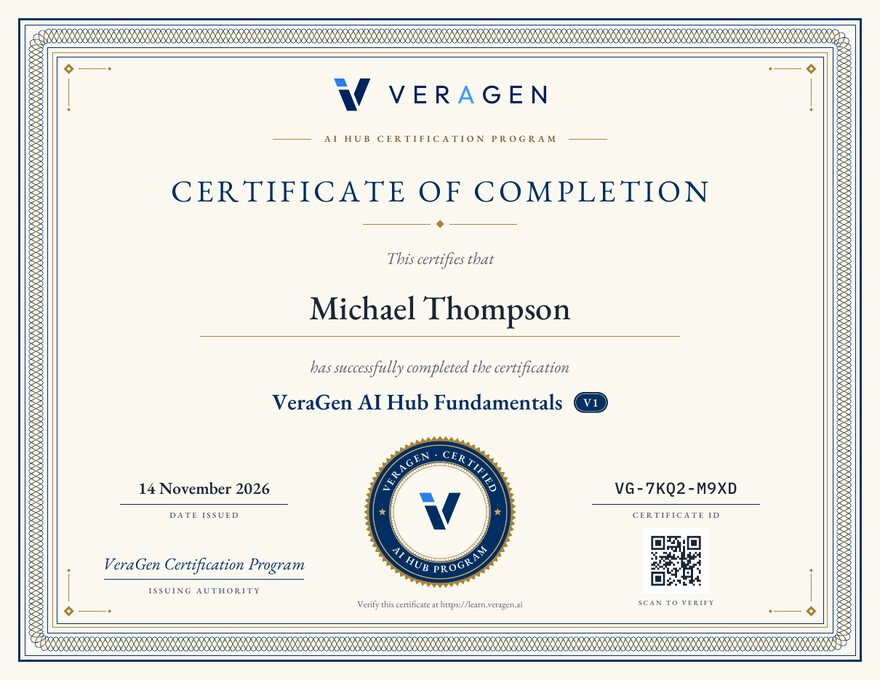
Certifications with an ID and QR code anyone can verify, kept for good.
See certifications →
A certificate says you passed tests on real tasks in a real product, under your own name, on a date anyone can look up.
An employer scans the QR code or types the ID and sees whether it is valid, whose it is and which version.
Remote and contract work turns on trust. A verified certification answers the first question a client asks.
Add it to LinkedIn in one click, put the QR code on your résumé, and keep a profile that lists every certification.
Start with Fundamentals; Professional and Advanced certifications for each app build on it.
Certificates do not expire. A newer version of a course never cancels the one you passed.
Start with Fundamentals. It is free.
Use your VeraGen account, or your email and a 6-digit code. Your progress and certificate are kept in it.
Pass each module at 80%. 3 attempts per test in any 3 months.
In your name, with an ID, a QR code and a PDF, listed on your profile.
Type the ID printed on the certificate, or scan its QR code. You see whether it is valid, whose it is, which certification and version, and when it was issued. The holder’s email is never shown.
Every certificate’s permanent address: learn.veragen.ai/verify/VG-XXXX-XXXX